


A successful webinar isn’t accidental. It results from meticulous strategy, targeted promotion, and intelligent content recycling. This Ultimate Webinar Guide transforms your isolated events into powerful, long-term marketing assets.
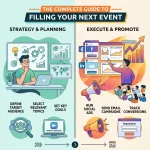
This comprehensive Ultimate Webinar Guide provides a three-part framework for webinar success. You will learn to set SMART goals and choose the right platform, execute a multi-channel Ultimate Webinar Guide promotion strategy, and master the art of repurposing content. Follow these steps to maximize ROI and turn one-time events into evergreen lead generators.
Part 1: The Foundation – Meticulous Webinar Planning
The success or failure of your Ultimate Webinar Guide is often determined long before you go live. The planning phase is where you set your strategy, define your objectives, and build the technical and content framework. Rushing this stage is a recipe for low attendance and poor results. A thorough approach to planning is essential for laying a strong foundation for your entire webinar marketing campaign.
Setting Clear, Measurable Goals (SMART)
Before you draft a single slide or write a promotional email, you must answer one critical question: “What are we trying to achieve?” Without a clear goal, you cannot measure success. Use the SMART framework to define your objectives with precision.
- Specific: Don’t just say “generate leads.” Say “generate 150 qualified leads from the C-suite in the tech industry.” This specificity guides your targeting for paid ads and email campaigns.
- Measurable: Your goal must be quantifiable. “Increase brand awareness” is vague. “Increase social media mentions by 20% during the week of the webinar” is measurable.
- Achievable: Be realistic based on your past performance. If your last webinar had 50 attendees, aiming for 5,000 is probably not achievable without a massive budget increase. Aim for steady, incremental growth.
- Relevant: Does the Ultimate Webinar Guide align with your broader business objectives? If your company’s focus is customer retention, a Ultimate Webinar Guide on upselling existing customers is more relevant than one focused purely on cold lead acquisition.
- Time-Bound: Set a deadline. “Generate 50 demo requests within one week of the webinar.”
Common Webinar Goals to Consider
- Lead Generation: Capturing contact information from new prospects is the most common goal. This feeds your sales funnel and supports inbound marketing efforts.
- Brand Awareness: Establishing your company as a thought leader in your industry. This is often measured by reach and social engagement.
- Customer Onboarding/Training: Educating new users to improve product adoption and reduce churn. This directly impacts customer retention.
- Sales Conversion: Driving direct purchases or demo requests for high-ticket items. These are often called high-ticket sales webinars.
Choosing Your Topic and Format
Your topic is the single most important factor in driving registrations. It needs to be relevant, timely, and valuable. A great starting point is exploring trending webinar topics that align with your audience’s current challenges. Use social listening tools to see what questions your audience is asking on LinkedIn or X (formerly Twitter).
Once you have a compelling topic, choose the format that best delivers the content. Not all webinars are the same, and mixing up formats can keep your audience engaged over time.
- Single-Speaker Presentation: A classic format where one expert presents slides. This is best for deep-dive tutorials or academic content. It establishes strong authority but can lack energy if the speaker isn’t dynamic.
- Panel Discussion: Features multiple experts discussing a specific topic. This is great for offering diverse perspectives and leveraging guests’ audiences for influencer marketing. It requires a strong moderator to keep the conversation on track.
- Live Q&A / “Ask Me Anything” (AMA): A highly interactive format that builds trust and answers specific audience questions. This format requires less preparation but high expertise.
- Product Demo: A focused walkthrough of your product, framed around solving a specific problem. To be effective, this shouldn’t feel like a sales pitch but rather a solution demonstration.
Selecting the Right Webinar Platform
Your technology can make or break the experience. A clunky platform with poor audio quality will undermine even the best content. When selecting a platform, consider your technical needs and your audience’s preferences.
Key Features to Look For:
- Reliability: Does the platform have a reputation for stability? Technical glitches are the number one reason attendees leave early.
- Interactive Tools: Does it support polls, Q&A, chat, and breakout rooms? These are crucial for your webinar engagement strategies.
- Integrations: Does it integrate with your CRM (like Salesforce or HubSpot) and marketing automation software for seamless lead management?
- Analytics: Does it provide detailed reports on registration, attendance, and engagement metrics? You need data-driven insights to improve.
|
Platform Tier |
Example Platforms |
Best For |
|---|---|---|
|
Beginner |
Zoom Webinars, GoToWebinar |
Small businesses and those new to webinars. Easy to use but limited branding. |
|
Intermediate |
Demio, Livestorm |
Marketers focused on customer experience and automation. Good browser-based options. |
|
Advanced |
ON24, BigMarker |
Enterprises needing deep analytics, branding strategies, and complex integrations. |
Designing High-Impact Content
Your content must deliver on the promise of your title. If you promised “10 Secrets to SEO,” you better deliver 10 actual secrets, not fluff.
- The Hook: Start strong. Within the first 5 minutes, validate the audience’s problem and tease the solution.
- Visuals: Avoid “death by PowerPoint.” Use high-quality images, minimal text, and data visualization to make your points.
- Interactivity: Plan for interaction every 7-10 minutes. This could be a poll, a chat question, or a whiteboard session. This keeps the “passive” viewer from tuning out.
Part 2: Driving Attendance – Strategic Webinar Promotion
You could have the greatest content in the world, but it means nothing if no one shows up. A robust promotional plan is not an option; it’s a necessity. This section of our Ultimate Webinar Guide focuses on the tactics that fill virtual seats.
Crafting a High-Converting Landing Page
Your registration page is the gateway to your webinar. It has one job: to convince visitors to sign up. Follow these webinar landing page best practices to maximize your conversion rate.
- Compelling Headline: Clearly state the benefit. Instead of “Webinar on SEO,” use “How to Double Your Organic Traffic in 90 Days.” The headline should focus on the “after state”—what will the attendee achieve?
- Bulleted Takeaways: List 3-5 specific things the attendee will learn. Be specific. “The 3-step framework for…” is better than “Learn about…”
- Speaker Bios: Showcase your speakers’ expertise. Include professional headshots and logos of companies they have worked with to build authority.
- Social Proof: Add testimonials from past attendees or logos of well-known companies that have registered. Social proof reduces the perceived risk of wasting time.
- Simple Form: Only ask for essential information. Name and email are often enough for top-of-funnel events. Every extra field (like phone number or company size) reduces conversions.
- Urgency: Use a countdown timer to create a sense of scarcity, especially as the date approaches.
Executing a Multi-Channel Email Campaign
Email remains one of the most effective channels for webinar promotion. However, email marketing services can be tricky—you don’t want to spam your list. Plan a strategic multi-email sequence.
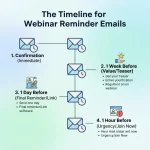
Sample Email Promotion Schedule:
- 2 Weeks Out (The Announcement): Focus on the core problem and the promised solution. This is for your “early birds.”
- 1 Week Out (The Social Proof): “Meet the experts.” Highlight your speakers and their credentials. Include a testimonial from a previous event.
- 3 Days Out (The Interaction): “Last chance to ask a question.” Build interactivity by inviting pre-submitted questions. This increases investment from the registrant.
- Day Of (The Reminder): “See you today!” A simple morning reminder to boost attendance.
- 15 Minutes Before (The Nudge): “We’re starting soon!” This final nudge is often the most effective in getting registrants to actually log on.
Pro Tip: Segment your lists for hyper-personalization. Send slightly different messages to current customers (focusing on advanced tactics) versus cold leads (focusing on foundational concepts).
Leveraging Social Media and Paid Ads
Extend your reach beyond your email list with strategic social media management.
- Create a Hashtag: A unique hashtag helps centralize the conversation around your event across LinkedIn, X, and Instagram.
- Video Teasers: Post short video clips of your speaker giving a sneak peek of the content. Video marketing is far more engaging than static images and helps the audience connect with the speaker.
- Employee Advocacy: Encourage your team to share the Ultimate Webinar Guide on their personal LinkedIn profiles. A share from an individual often has more reach and credibility than a post from a company page.
- Paid Ads: Use programmatic ads and targeted social ads to reach your ideal customer profile (ICP). Create a “lookalike audience” based on your existing customers for highly effective targeting. Retargeting ads to people who visited your landing page but didn’t register is a high-ROI tactic.
Partner Marketing and Co-Promotion
One of the fastest ways to grow your audience is to borrow someone else’s. Partner with non-competing brands or influencers for co-marketing.
- Guest Speakers: Invite an industry expert to speak. They will likely promote the event to their email list and social following.
- Affiliate Marketing: Offer a commission or referral fee to partners who drive registrants to your high-ticket sales webinars.
- Newsletter Swaps: Agree to mention a partner’s content in your newsletter in exchange for them promoting your webinar.
Part 3: Maximizing ROI – Repurposing Webinar Content
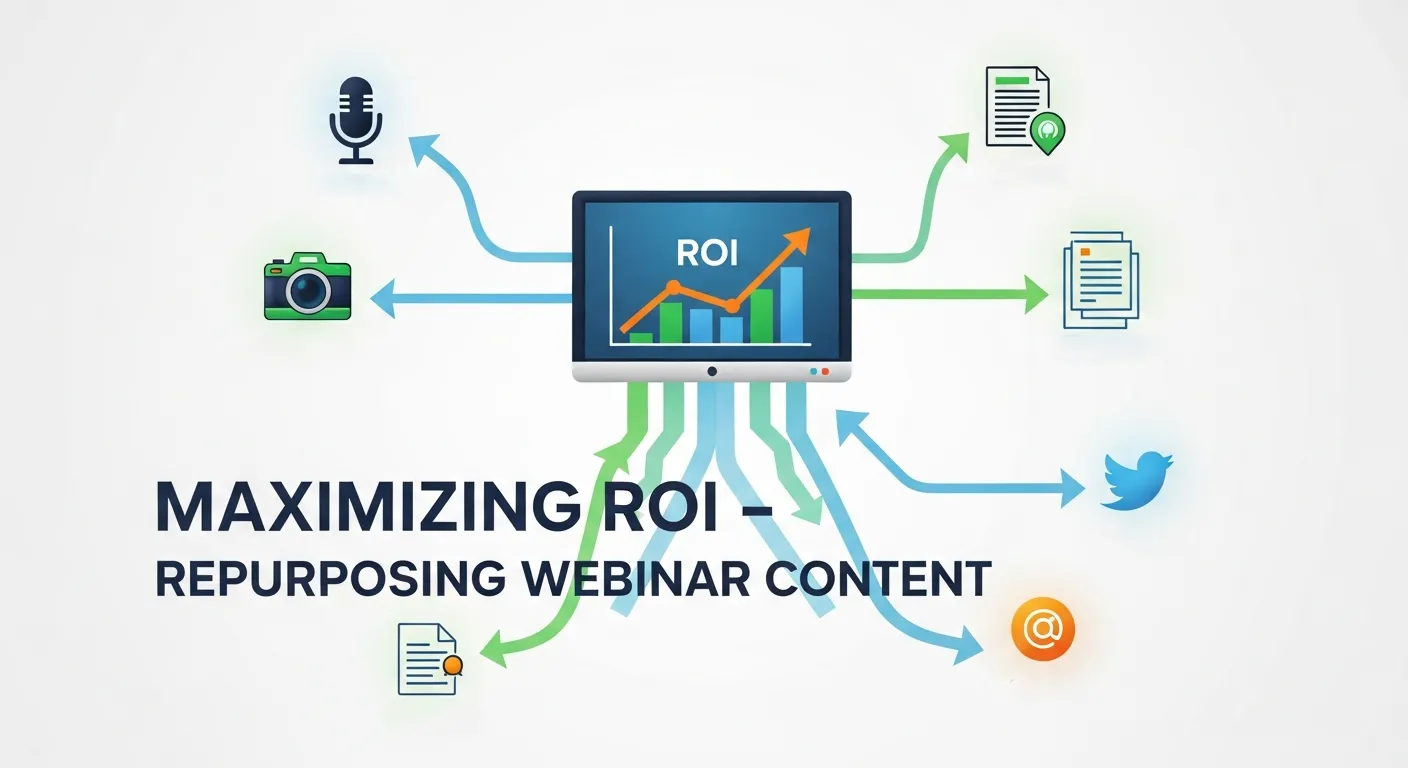
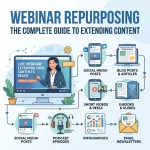
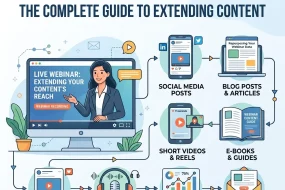
The live event is just the beginning. The real value is unlocked when you master the art of repurposing webinar content. A single one-hour Ultimate Webinar Guide can fuel your content marketing strategy for weeks or even months. This is where the concept of the evergreen webinar funnel comes into play.
The Content Waterfall Strategy
Think of your Ultimate Webinar Guide as a large “content boulder.” Your job is to break it down into smaller, more shareable “rocks” and “pebbles.”
- The Recording (The Boulder): The full, on-demand webinar recording is your primary asset. Gate it behind a form on your website to create an evergreen webinar funnel that generates leads 24/7. Use SEO optimization on the replay page to capture organic traffic searching for your topic.
- The Blog Post (The Big Rocks): Write a comprehensive blog post that summarizes the key takeaways from the webinar. Embed the full video recording within the post. Transcribing the webinar audio is a great starting point for this. This helps you rank for LSI keywords related to your topic.
- The Social Media Clips (The Pebbles): Edit the webinar recording into a dozen or more 30-60 second video clips. Each clip should focus on a single, powerful tip or quote. Share these across LinkedIn, TikTok, Instagram Reels, and YouTube Shorts.
- The Infographic/Carousel (The Sand): Pull out key statistics, frameworks, or step-by-step processes from your webinar and turn them into a visually appealing infographic or a LinkedIn carousel post. This type of interactive content is highly shareable.
Advanced Repurposing Ideas
- Create a Podcast Episode: Strip the audio from the webinar recording and release it as a podcast episode. This caters to audiences who prefer to listen on the go and taps into voice search optimization trends.
- Develop an Email Mini-Course: Break down the webinar’s main points into a 5-day automated email course. This is a great way to nurture new leads and provide ongoing value.
- Update an Old Blog Post: Find an existing blog post on a related topic and embed a relevant clip from your webinar within it to add fresh value and improve “time on page” metrics (a positive signal for SEO).
- Answer Quora/Reddit Questions: Find questions on public forums related to your Ultimate Webinar Guide topic and answer them, linking back to a relevant video clip or the summary blog post. This builds backlinks and drives targeted traffic.
Analyzing Performance and Iterating
No Ultimate Webinar Guide is complete without discussing measurement. You must analyze your data to improve future events.
- Attendance Rate: The percentage of registrants who actually attended. (Benchmark: 40-50%).
- Engagement Score: Most platforms provide a score based on how long attendees stayed and how much they interacted.
- Conversion Rate: The percentage of attendees who took the desired action (e.g., requested a demo).
- Drop-off Points: Look at your analytics to see when people left the webinar. Did they leave during the demo? During a long monologue? Use this customer perception data to tighten up your content for next time.
Conclusion
A high-ROI Ultimate Webinar Guide strategy is a three-legged stool, built on the solid foundations of planning, promotion, and repurposing. By following this Ultimate Webinar Guide, you set yourself up for success. By implementing savvy webinar promotion strategies, you ensure your message reaches the right audience. And by mastering the art of repurposing, you transform a one-time event into a lasting asset that drives results for months to come.
The journey to webinar mastery is ongoing. Trends like AI and automation and the metaverse will continue to shape how we present and interact. Stay curious, keep testing, and use this framework as your map to navigating the exciting world of webinar marketing.
Frequently Asked Questions (FAQs)
1. How long should a Ultimate Webinar Guide be?
The ideal length for most B2B webinars is typically 45-60 minutes. This allows for about 35-40 minutes of presentation content and leaves 15-20 minutes for a live Q&A session. Q&A is often the most valuable part for attendees as it addresses their specific concerns. However, “micro-webinars” (15-20 minutes) are becoming popular for highly specific topics.
2. What are the most important metrics to track for webinar ROI?
To measure true ROI, look beyond vanity metrics. Track Cost Per Lead (CPL), the value of the sales pipeline generated from attendees, and ultimately, closed-won revenue attributed to the webinar. For engagement, monitor the attendance rate (registrants vs. attendees) and average view time.
3. What is the biggest mistake people make in webinar planning?
The biggest mistake is not having a clear goal. Without a defined objective (e.g., lead gen vs. customer training), you can’t tailor the content, promotion, or follow-up effectively. This leads to a “generic” presentation that fails to resonate with anyone.
4. How can I make my product demo webinar not feel like a sales pitch?
Frame the entire demo around solving a specific problem or narrative. Instead of a feature-by-feature tour (“Here is the settings menu…”), tell a story: “Here was the customer’s challenge… and here is exactly how they used our platform to solve it.” This makes it educational and focuses on value rather than features.
5. Is it better to have a live webinar or an on-demand (simulated live) one?
Both have their place in a balanced strategy. Live webinars create urgency (“scarcity”) and allow for real-time interaction, which builds trust. On-demand or evergreen webinar funnels are excellent for scalability and generating leads over the long term without requiring your team to be present every time.
6. How many reminder emails are too many?
A sequence of 3-4 emails in the week leading up to the event is standard practice and generally accepted. The key to avoiding “spam fatigue” is to add new value in each email—highlight a different speaker, share a surprising statistic, or ask a question—rather than just repeatedly saying “Don’t forget to attend.”
7. What is the most underrated webinar promotion tactic?
Employee advocacy. A personal share on LinkedIn from someone on your team (sales, product, or leadership) often gets significantly more visibility and feels more authentic than a polished post from the official company page. Provide your team with pre-written copy and graphics to make it easy for them.
8. Can I repurpose a Ultimate Webinar Guide that had low attendance?
Absolutely! Low live attendance doesn’t mean the content was bad; it often indicates a promotion or timing issue. If the content is valuable, it can still make an excellent blog post, a series of social media clips, or a lead magnet. In fact, repurposing is the best way to salvage ROI from a poorly attended live event.
9. How do I choose the right speakers for a panel discussion?
Look for a diverse set of experts who offer different—even conflicting—perspectives. If everyone agrees, the panel is boring. You want constructive debate. Also, consider their existing audience size and willingness to co-promote, as guest speakers can be a major driver of registrations.
10. What’s the first piece of content I should create when repurposing my webinar?
Start with a comprehensive summary blog post. It serves as a central hub for all other repurposed assets. You can embed the full video, link to individual clips, include the slide deck, and use it to drive long-term SEO traffic. This asset becomes the “home base” for that topic on your website.




No Comments